

.png)
When a large retailer, distributor, or enterprise customer onboards you as a supplier, one of the first things they'll send over is an EDI trading partner guide. It outlines the document formats they require, the transmission protocols they expect, and the compliance standards you need to meet. Non-compliance typically means chargebacks, delayed payments, or removal from the vendor program.
EDI (Electronic Data Interchange) is the technology standard that enterprise trading partners use to automate the exchange of business documents. It predates modern ecommerce platforms by decades. Shopify has no native EDI module in the admin, but the two systems can work together effectively through an app connector, an iPaaS integration platform, or a custom API integration.
This guide covers how EDI integrates with Shopify for B2B manufacturers and what you need to know before committing to an approach.
EDI replaces paper (and email) documents with structured electronic data in standardized formats. In North American B2B commerce, the dominant standard is ANSI X12. In Europe and internationally, EDIFACT is more common. The documents are transmitted via AS2, SFTP, or through a Value Added Network (VAN), which acts as a postal service for EDI traffic.
Large retailers (Walmart, Target, Home Depot, Costco) and enterprise distributors mandate EDI because it allows their procurement systems to process purchase orders, receive acknowledgments, and reconcile invoices without human intervention. When you're their supplier, you're plugging into their automated workflow. If your responses aren't formatted correctly, timed correctly, or transmitted via their required protocol, their systems reject them and trigger chargebacks.
Common EDI documents manufacturers handle:
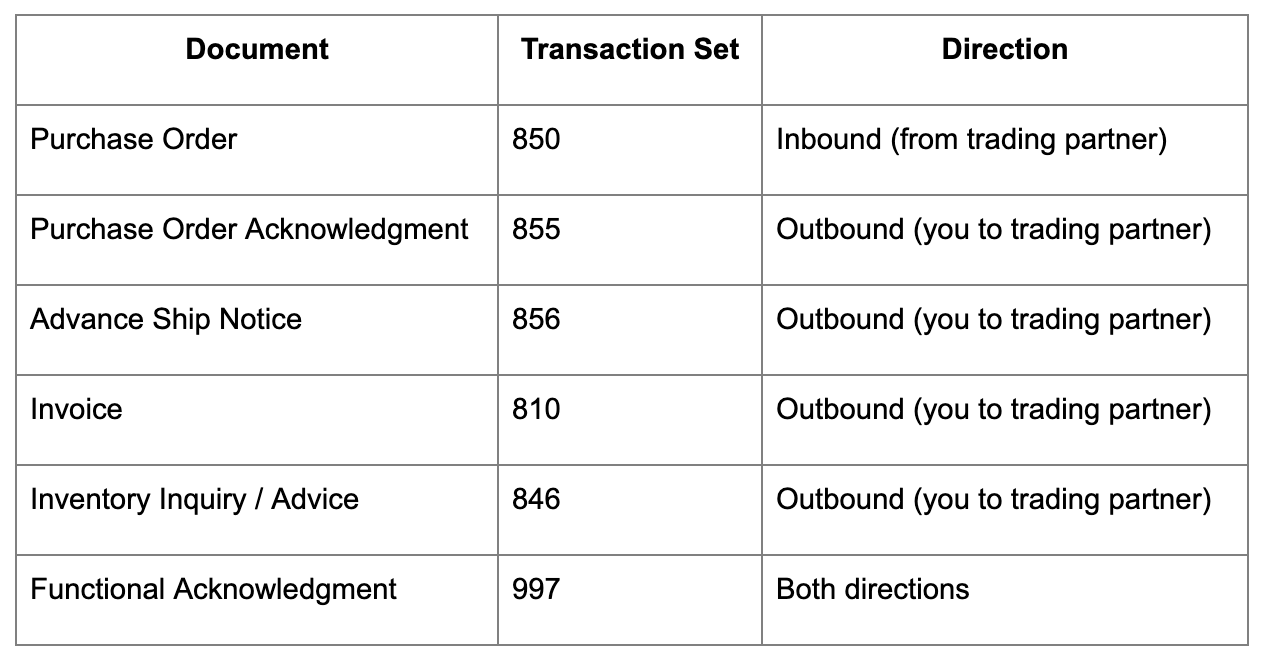
The 850 purchase order is where most manufacturers focus first. Every other document is a response to that inbound PO.
Shopify has no native EDI module and doesn't handle X12 or EDIFACT document formats directly. What Shopify provides is a set of APIs for managing orders, inventory, customers, fulfillments, and B2B data (companies, catalogs, payment terms). EDI integration connects those APIs to the EDI document flow your trading partner requires.
The integration layer sits between Shopify and the trading partner and handles document translation, protocol connectivity (AS2, SFTP, VAN), and mapping between EDI field structures and Shopify's data model. Inbound 850 purchase orders become Shopify orders or draft orders; outbound fulfillment events become 856 ASNs and 810 invoices. That translation happens outside Shopify, not inside it.
The data that flows between EDI and Shopify typically includes: companies and customer accounts, orders and order updates, inventory levels, products, fulfillments, catalogs and price lists, payment term status, and customer PO numbers. What's available depends on the specific integration approach and whether the connector supports Shopify's B2B APIs.
There are three main ways to connect EDI to Shopify, each with different tradeoffs.
The fastest path for established ERP and EDI ecosystems. These are purpose-built integrations available on the Shopify App Store or directly from EDI providers. They handle VAN connectivity, document translation, trading partner onboarding, and the Shopify API connection in one package.
Providers with Shopify connectors include SPS Commerce Fulfillment (one of the largest EDI networks), TrueCommerce, DiCentral, and 1 EDI Source. Each manages the compliance layer on your behalf, including 997 acknowledgment handling and trading partner-specific mapping.
Best for: Manufacturers whose trading partners are already in the provider's network and whose EDI requirements are reasonably standard.
An iPaaS platform sits between Shopify and your EDI system (or ERP) and handles data transformation and routing. Tools in this category (Celigo, Boomi, MuleSoft, and others) support more complex mapping scenarios and can connect multiple systems beyond just Shopify and EDI.
Best for: Manufacturers already using an iPaaS for other integrations, or those needing more control over field-level mapping and data routing logic.
A custom-built integration against Shopify's APIs, written to match your specific EDI partner requirements and internal data model. The most flexible option and the most resource-intensive to build and maintain.
Best for: Manufacturers with highly unique EDI mapping requirements, no viable pre-built connector, or teams with existing development capability who want full control.
Before committing to a provider or approach:
The most important design decision in an EDI-Shopify integration is where the inbound 850 purchase order lands.
Option 1: Direct order creation
The EDI provider creates a standard order in Shopify immediately upon receiving the 850. This is faster but removes the review step. If the PO has an item not in your Shopify catalog, an invalid address, or a quantity your inventory can't fill, you're dealing with a live order that needs manual correction.
Option 2: Draft order creation
The EDI provider creates a draft order in Shopify, giving your team a review window before the order is confirmed. This is the recommended approach for most B2B EDI scenarios. The draft order can be reviewed for inventory availability, pricing accuracy, and catalog alignment before being converted to a live order and acknowledged back to the trading partner with an 855.
The draft order review workflow in Shopify Plus supports this pattern well. For how to structure that review step, see How to Set Up B2B Order Review Workflows in Shopify.
Order tagging for EDI orders
Regardless of which approach you use, tag EDI-sourced orders consistently (for example, edi-order, trading-partner-walmart, edi-850-received). Tags make it possible to filter, report, and build Shopify Flow automations specifically for EDI orders without touching non-EDI workflows.
On Shopify Plus, each EDI trading partner should be set up as a B2B company account. This gives you several advantages:
When your integration creates orders in Shopify, orders can be associated with the correct company account if the integration is configured to pass the customer and company reference via the B2B API. This is worth specifying during setup rather than treating EDI orders as standalone transactions.
One important check: not all EDI connectors and iPaaS integrations support Shopify's B2B APIs. Some older connectors interact only with the standard Orders and Customers APIs and don't recognize companies, company locations, or catalogs. If you're on Shopify Plus and using B2B features, confirm B2B API compatibility with your integration provider before committing to an approach.
For configuration of payment terms per account, see Best Payment Options for B2B Customers on Shopify.
The outbound half of the EDI loop is driven by what happens in Shopify after the order is received.
855 Purchase Order Acknowledgment
Sent back to the trading partner to confirm you received the PO and whether you can fulfill it (full acceptance, partial acceptance, or rejection). This typically needs to be transmitted within 24-48 hours of receiving the 850. If your process involves draft order review, the 855 fires after the review step, not immediately on receipt.
856 Advance Ship Notice
Sent when the order ships. The 856 must include accurate shipment details: carrier, tracking number, ship date, item quantities, and often carton-level details (dimensions, weight, packing configuration). Large retailers have strict 856 requirements, and an ASN that arrives after the shipment or contains incorrect carton data triggers chargebacks.
Your EDI provider pulls shipment data from Shopify (via fulfillment events and order data) and generates the 856. The accuracy of this document depends on how well your Shopify fulfillment process captures carrier and packing data.
810 Invoice
Sent after shipment. Invoice data is pulled from the Shopify order (line items, quantities, prices, customer and shipping details). For EDI customers, pricing in the invoice must match the original 850 PO. Discrepancies trigger invoice disputes and payment delays.
846 Inventory Inquiry / Advice
Some trading partners periodically request your inventory levels. The 846 response is generated from your Shopify inventory data. If you're using Shopify's multi-location inventory, the integration needs to be clear about which location's inventory to report.
Many manufacturers run a three-way integration: trading partner EDI → EDI provider → Shopify → ERP. In this setup, Shopify is the order management and customer-facing layer, and the ERP handles inventory, production, and accounting.
Two common patterns:
EDI → Shopify → ERP: The EDI provider creates orders in Shopify, and a separate integration syncs those orders into the ERP as sales orders. The ERP processes fulfillment, and shipment data flows back to Shopify, which then triggers the outbound 856 via the EDI provider.
EDI → EDI provider → ERP (Shopify as catalog only): For some manufacturers with complex ERP-driven fulfillment, the EDI provider integrates directly with the ERP, and Shopify serves primarily as the product catalog and customer portal. EDI orders don't touch Shopify at all.
The right architecture depends on where order management actually lives in your operation. If your warehouse and fulfillment team works out of Shopify, route EDI orders through Shopify. If your ERP drives fulfillment, the EDI-to-ERP path may be simpler.
For ERP integration guidance, see Shopify ERP Integration: A Guide.
EDI compliance chargebacks are financial penalties your trading partner deducts from your invoice when you don't meet their EDI requirements. They are common, often automatic, and add up quickly.
Common chargeback triggers:
Your EDI provider's compliance monitoring tools surface many of these issues before they generate chargebacks. Most providers include trading partner scorecard reporting that shows your compliance rate per document type and per trading partner.
EDI handles the structured document exchange with trading partners. Shopify Flow and n8n handle the operational automation around it.
Shopify Flow is useful for:
n8n is useful when you need to bridge Shopify with systems outside the EDI provider's scope:
n8n is particularly useful if your EDI provider handles document translation but you need custom logic for how that data moves through your internal systems.
If you're new to EDI or adding a new large trading partner that requires it:
Test with the trading partner before going live: Most large retailers have a formal trading partner testing process. Your EDI provider facilitates this. Don't skip it.

.png)
