


.png)
Most manufacturers know their cost per unit. Almost none know their cost per purchase order.
The number is higher than they expect, and it is invisible because it is spread across several people doing small pieces of the same task. No single person is responsible for it. No single budget line captures it. It just exists as friction, absorbed into the week as normal overhead.
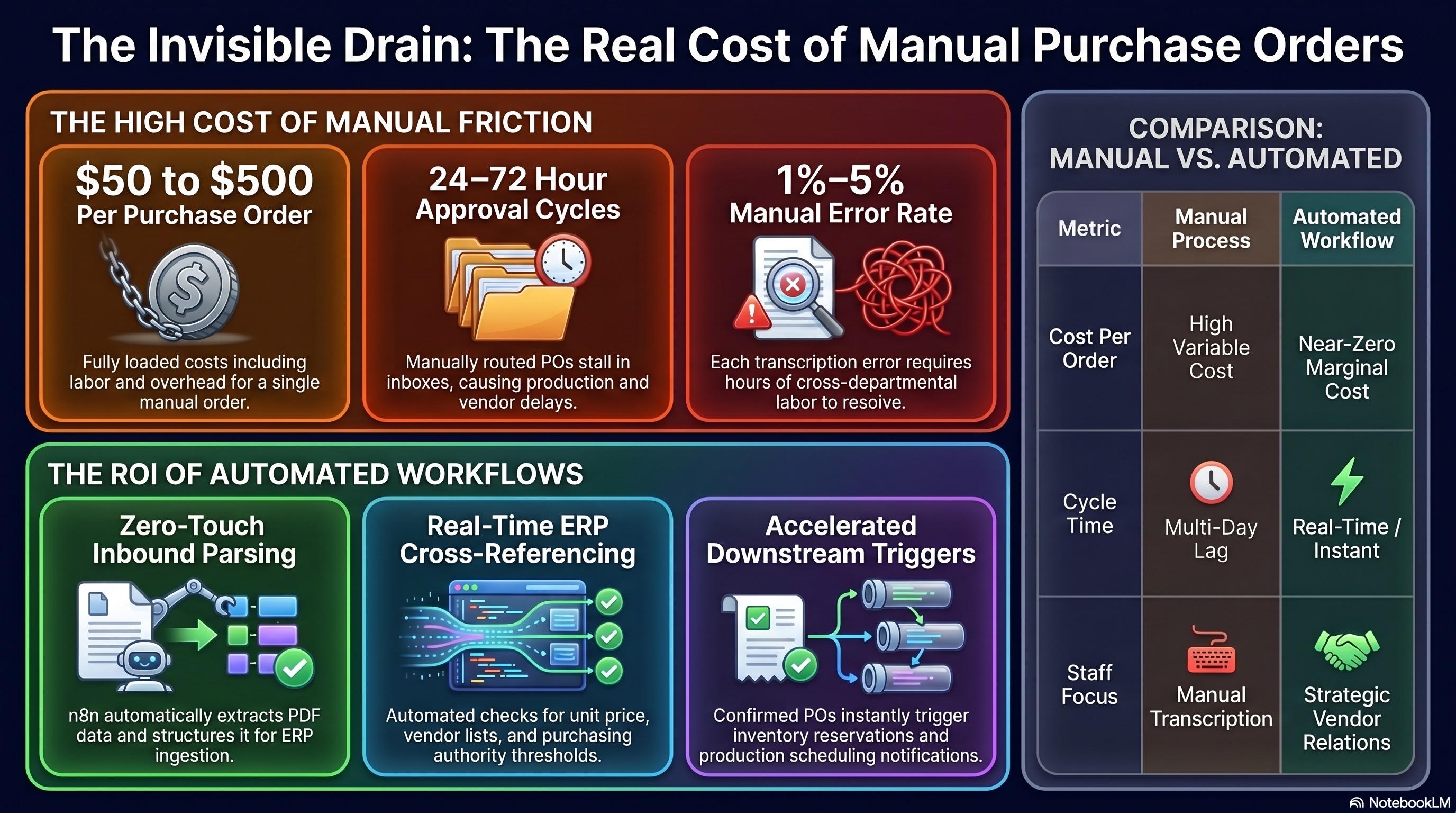
APQC benchmarks put the fully loaded cost of manual purchase order processing between $50 and $500 per order, depending on complexity, approval requirements, and error rate. At 200 purchase orders per month, that range puts your processing cost between $10,000 and $100,000, before a single error is corrected or a single dispute is resolved.
Most operations leaders who see that number the first time do not believe it. Then they count the steps.
Manual PO processing cost is not a single line item. It accumulates across four distinct categories.
Every purchase order that arrives by email, fax, or PDF requires someone to read it and re-enter the line items into the ERP. A clean, three-line PO from a familiar vendor takes five minutes. A complex PO with forty line items, partial SKU matches, and a non-standard format takes thirty. Multiply that average across your monthly volume.
This is not skilled work. It is transcription. It is also work that generates errors at a rate that scales with volume and speed.
Most POs above a certain value require approval before a purchase commitment is made. In a manual process, that approval lives in someone's inbox. The request was sent. The approver has not seen it yet. The vendor is waiting. The production schedule that depends on the incoming material is also waiting.
The average approval cycle for a manually routed PO in a mid-market manufacturing environment is 24 to 72 hours, not because the decision takes that long, but because the request has to find its way to the right person and that person has to find time to act on it.
When a line item is mis-keyed, a price discrepancy is missed, or a quantity differs from the original requisition, the error propagates forward until it surfaces. Usually it surfaces at receiving, at invoice reconciliation, or during a vendor dispute.
Each correction event involves at least two people: the person who discovers the discrepancy and the person who has to trace it back, identify the source, and resolve it. In some cases, a corrected PO has to be reissued and reapproved, restarting the approval cycle entirely.
Error rates in manual data entry environments typically run between 1 and 5 percent. At 200 POs per month and a 3 percent error rate, that is six POs per month in active error correction, each consuming an hour or more of staff time.
A purchase order that has not been confirmed in the ERP cannot trigger the downstream processes that depend on it: inventory commitments, production scheduling, logistics planning, or customer order promises. The delay in processing is not just an administrative delay. It is a production delay dressed as paperwork.
When a production scheduler is waiting on a PO confirmation before they can commit capacity, or a customer service rep cannot confirm a delivery date because the incoming material is unconfirmed, the cost of the manual process extends well beyond the purchasing department.
An n8n workflow that handles inbound purchase order processing eliminates each of these cost sources systematically.
Inbound parsing. POs that arrive by email are captured automatically. n8n parses the email body or attached PDF, extracts the line items, quantities, unit prices, and vendor ID, and structures them into a format the ERP can receive. No one reads the email and types the data.
ERP cross-reference. Each line item is checked against the ERP in real time. The agreed unit price for each SKU is retrieved and compared against the price on the PO. Quantity limits, approved vendor lists, and purchasing authority thresholds are checked automatically.
Routing on results. Clean POs, where every line item matches within tolerance and the total is within the approver's authority, are confirmed and entered automatically. Nothing human touches them. POs with discrepancies are routed to a reviewer with the specific discrepancy flagged, the variance calculated, and a link to approve or reject the override. POs above the authority threshold are routed to the correct approver based on the dollar amount, not whoever happens to be on the distribution list.
Vendor acknowledgment. A purchase order acknowledgment goes to the vendor automatically when a clean PO is confirmed. No one drafts it. The vendor has confirmation faster than in the manual process.
Downstream triggers. Once the PO is confirmed in the ERP, the workflow can trigger downstream steps: inventory reservation, production scheduling notifications, or expected delivery date updates to the relevant systems.
Take your most recent month of purchase order volume. Multiply by $50. That is the conservative floor of what your team is paying to process them manually.
If your average PO is more complex (multiple line items, approval requirements, non-standard vendor formats), the per-order cost is higher. If your error rate is above 1 percent, add the correction cost on top.
That number is not a reason to automate on its own. The reason to automate is what your team does with the time that processing was consuming. A purchasing coordinator who is not re-entering line items is available for vendor relationships, contract reviews, cost reduction initiatives, and the supplier conversations that actually require judgment.
If your PO volume is primarily standard (clean PDFs, consistent formats, known vendors), the parsing and cross-reference workflow is the right first build. It handles the majority of your volume and the manual work is almost entirely eliminable.
If your volume has significant variation (non-standard formats, mixed EDI and email, vendors who submit incorrectly), start with the approval routing workflow. Route everything to a reviewer for now, but structure the alert so the reviewer can approve in one click rather than digging through email. That alone compresses your approval cycle significantly, even before the parsing layer is added.
Three questions before you build:
If you can answer all three, the build is ready to scope.
Check if your PO workflow qualifies for our 3x ROI guarantee.

.png)
