

.jpg)
.png)
Most workflow automation roundups are written for marketers. They evaluate tools based on how well they handle email sequences, lead routing, or content publishing. That is not your problem.
If you are a COO, VP of Operations, or ops manager at a manufacturing or distribution company, your workflows look different. You are dealing with purchase order approvals, ERP data syncs, inventory alerts, supplier notifications, and production reporting. The tools that work for a marketing team do not always hold up at operational scale.
This guide evaluates workflow automation tools against what actually matters for manufacturing and ops teams.
Before getting into the list, here are the criteria that matter most for manufacturing and ops contexts:
Best for: Operations teams that need full control
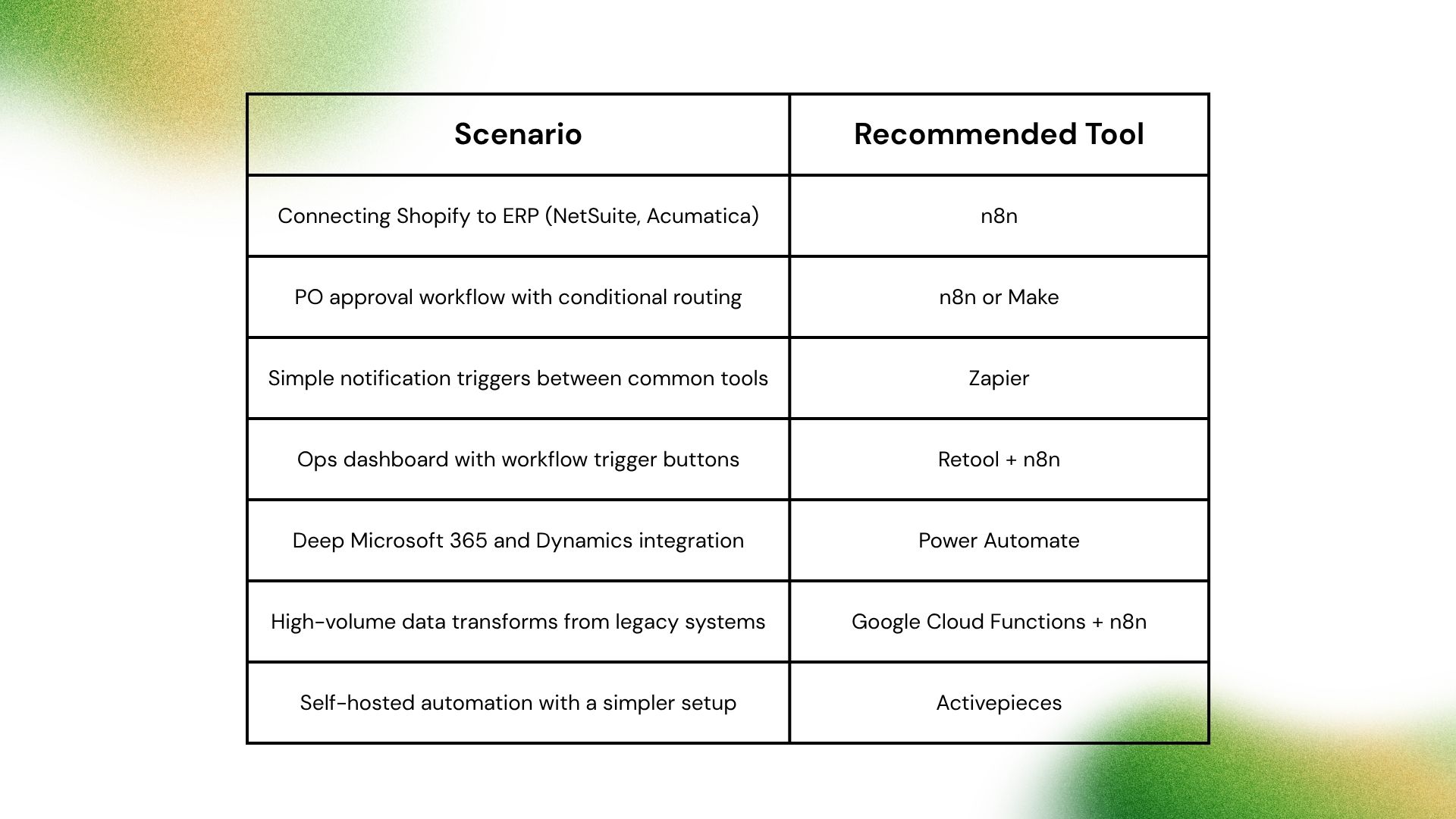
n8n is an open-source workflow automation platform with a visual node-based builder and full JavaScript support. It can be self-hosted on your own infrastructure, which is a significant differentiator for manufacturers handling sensitive supply chain data.
Manufacturing use case: Auto-sync new purchase orders from your ERP, generate a formatted PO document, send a supplier notification email, post a summary to a Slack channel for the purchasing team, and log the transaction to a Google Sheet, all in a single workflow.
Why it works for ops:
Pricing: Free (Community Edition, self-hosted). Cloud plans from $20/month (Starter, 2,500 executions/month, billed annually) up to $50/month (Pro, 10,000 executions/month). High-volume deployments typically run the Community Edition self-hosted, where the only cost is the VPS.
Watch out for: Steeper learning curve than point-and-click tools. Best results with a developer or technically capable ops team member building and maintaining workflows.
Best for: Internal ops dashboards that trigger workflows
Retool is a low-code platform for building internal applications: inventory dashboards, production tracking boards, vendor management interfaces, and ops portals. It pairs with n8n as a UI layer that triggers automated workflows.
Manufacturing use case: Build a reorder dashboard that shows current inventory levels against reorder points. When a team member clicks "Approve Reorder," it triggers an n8n workflow that creates the PO in your ERP and notifies the supplier.
Why it works for ops:
Pricing: Free up to 5 users (cloud). From $10/user/month (Starter).
Watch out for: Retool builds the interface but does not run automation logic. Use it alongside a tool like n8n, not instead of one.
Best for: Mid-complexity ops workflows without a developer
Make (formerly Integromat) uses a visual bubble-based builder that is more approachable than n8n for non-developers. It handles multi-step, multi-branch workflows well and has a large library of pre-built connectors.
Manufacturing use case: New supplier onboarding form submission creates a vendor record in your tracking spreadsheet, routes an approval request to the procurement manager, and once approved, triggers a welcome email with onboarding documents attached.
Why it works for ops:
Pricing: Free (1,000 credits/month). From $9/month (Core, 10,000 credits/month).
Watch out for: Per-credit pricing. In Make, every step in a workflow consumes one credit. A 10-step workflow running 500 times per day equals 5,000 credits per day, or 150,000 credits per month. Costs scale faster than they appear at signup.
Best for: Simple, low-volume triggers between common tools
Zapier is the most widely used automation platform and the fastest to set up for simple two-step workflows. It has the largest pre-built connector library (8,000+ apps).
Manufacturing use case: New order in Shopify creates a fulfillment task in your project management tool and sends a notification to the warehouse team lead.
Why it works for ops (in limited cases):
Pricing: Free (100 tasks/month). Professional plan from $49/month (billed annually).
Watch out for: Per-task pricing becomes expensive quickly at ops volume. Limited conditional logic. Cloud-only with no self-hosting option. Not suited for complex multi-step operational workflows that run at high frequency.
Best for: Operations teams already running on Microsoft
If your team runs on Microsoft 365, Teams, Dynamics, or Azure, Power Automate integrates more deeply than any other option. Native connections to SharePoint, Teams, Outlook, Dynamics 365, and Dataverse make it the obvious choice inside a Microsoft stack.
Manufacturing use case: A quality control form submitted in SharePoint triggers a Teams approval workflow. Once approved, it updates a Dynamics record and sends a confirmation to the supplier contact.
Why it works for ops:
Pricing: From $15/user/month (Power Automate Premium).
Watch out for: Weak outside the Microsoft ecosystem. Connector quality drops significantly for non-Microsoft tools. Not the right choice if your stack is mixed.
Best for: Teams that want an open-source alternative with a simpler setup than n8n
Activepieces is a newer open-source automation platform that can be self-hosted. It is more beginner-friendly than n8n while still offering data privacy through self-hosting.
Manufacturing use case: Webhook from a production monitoring system triggers a workflow that logs the event to a database and sends an alert to the ops team Slack channel.
Why it works for ops:
Pricing: Free (cloud, limited). Self-hosted is free. Cloud plans from $99/month (Organization).
Watch out for: Smaller ecosystem than n8n or Make. Fewer community resources and workflow templates. Suitable for straightforward workflows, not high-complexity ops automation.
Best for: Custom serverless logic when visual tools reach their limits
Google Cloud Functions is not an automation platform. It is a serverless compute environment where you deploy custom code (Python, Node.js, Go) that runs in response to triggers. For manufacturers with complex data transformation needs or legacy system integrations, it fills the gap that visual tools cannot.
Manufacturing use case: A nightly job pulls production data from a legacy system via SFTP, transforms it into a structured format, and writes it to a BigQuery table that feeds ops reporting dashboards.
Why it works for ops:
Pricing: First 2 million invocations per month are free. $0.40 per million invocations after that.
Watch out for: Requires developer skill. Not a standalone automation tool. It is the compute layer for when visual tools reach their limits.
Here is a scenario most roundups skip: 500 purchase order workflows per day, each passing through 8 steps.
That is 15,000 workflow executions per month and 120,000 individual steps per month.
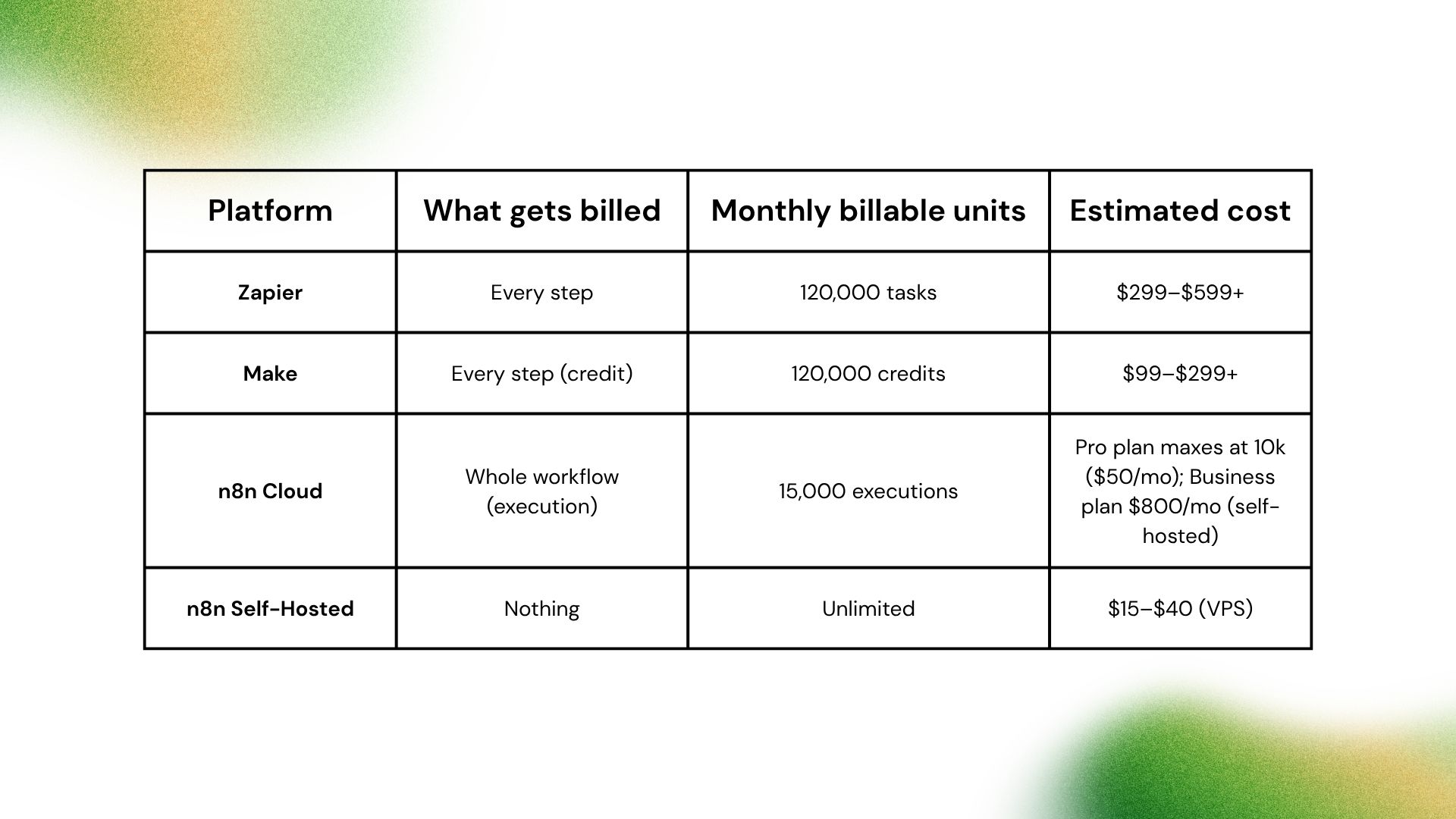
At 15,000 executions/month, n8n's Pro cloud plan (10,000 execution cap at $50/mo) is insufficient. The Business plan at $800/month covers 40,000 executions but is a self-hosted plan, meaning you are running your own infrastructure regardless. The Community Edition (free software) does the same thing for just the VPS cost.
The structural point holds at every volume: Zapier and Make charge per step, so complex multi-step workflows always cost more as you add logic. n8n charges per workflow run, so adding steps costs nothing extra.
If you are building an automation practice for your ops team and want a framework for prioritizing which workflows to tackle first, the Flow Kaizen guide covers how to identify and sequence the highest-ROI automations in a manufacturing or distribution operation.

.png)
