


.png)
Every comparison post for these three tools is written for the same audience: marketers, freelancers, and developers choosing an automation platform for their agency workflows or side projects.
This one is written for operations leaders. If you are evaluating workflow automation for purchase order routing, ERP integrations, inventory alerts, supplier notifications, or production reporting, the usual comparison criteria ("ease of use," "8,000 integrations," "drag-and-drop simplicity") do not tell you what you need to know.
Here is what does matter for ops teams:
We will answer all four for each platform.
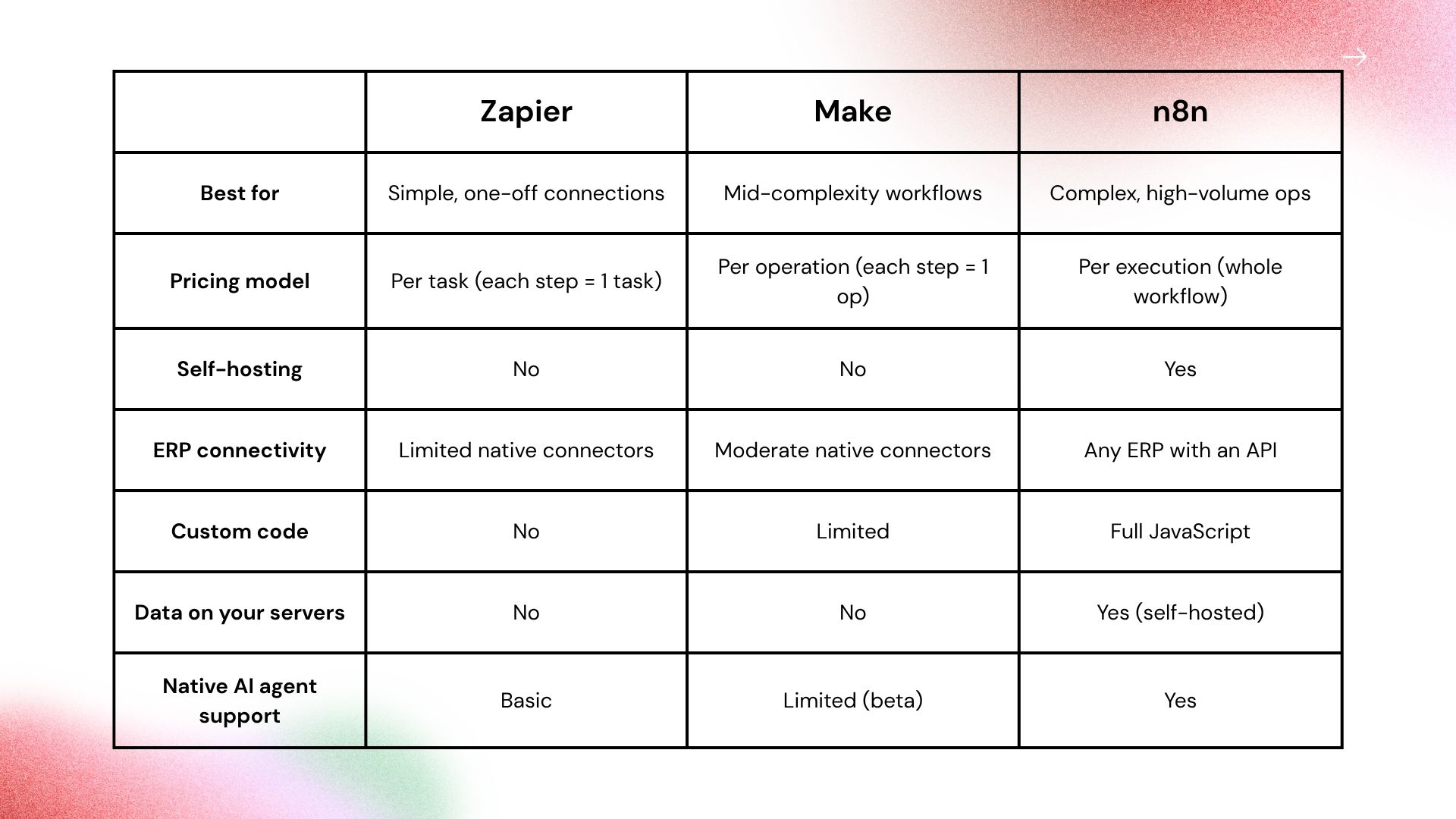
Zapier is the fastest path from "I want to automate this" to a live workflow. The connector library is massive (8,000+ apps), setup is point-and-click, and most common tool combinations work immediately without configuration.
Where it fits in ops:
Where it breaks down for operations teams:
Per-task pricing means every step in a multi-step workflow is billed separately. A 5-step PO workflow running 500 times per day equals 2,500 tasks per day, or 75,000 tasks per month. Zapier's Professional plan starts at $49/month (billed annually). You would need a significantly higher task tier to handle any real operational volume.
There is also no self-hosting. All workflow data, including the payloads passing through your workflows, runs through Zapier's servers. And conditional logic is limited: multi-branch approvals, exception handling, and loops require workarounds that get brittle at scale.
Bottom line: Zapier is the right tool for low-volume, simple workflows between common SaaS tools. It is not the right foundation for an ongoing ops automation practice.
Make (formerly Integromat) sits between Zapier and n8n in complexity. Its visual builder handles multi-branch logic better than Zapier, and the integration library is solid at 2,000+ connectors. For ops teams that want more sophisticated workflows without writing code, it is a meaningful step up.
Where it fits in ops:
Where it breaks down for operations teams:
Per-credit pricing still scales painfully at volume. Make charges per individual module run, so a 10-step workflow consumes 10 credits every time it executes. At 500 daily runs of a 10-step workflow, that is 150,000 credits per month. The Core plan includes 10,000 credits per month at $9.
Make is also cloud-only. No self-hosting option means your workflow data passes through Make's servers, including any ERP payloads, pricing data, or supplier information those workflows carry. The AI agent builder is in beta and limited compared to n8n's native support.
Bottom line: Make is a solid choice for mid-complexity workflows at moderate volume, especially for teams without developer resources. It does not solve the cost problem at true ops scale, and it does not solve the data privacy problem.
n8n is where this comparison shifts significantly for manufacturing and distribution teams. It is more complex to set up than Zapier or Make, but it is built on different assumptions that happen to match what ops automation actually requires.
n8n bills per workflow execution, not per step. A 2-step notification workflow and a 200-step PO approval chain both count as one execution. Cloud plans start at $20/month (Starter, 2,500 executions/month, billed annually) up to $50/month (Pro, 10,000 executions/month). At high execution frequency, the Community Edition self-hosted eliminates per-execution costs entirely.
n8n can be deployed on your own server via Docker. Once self-hosted, workflow execution never touches n8n's servers. For manufacturers whose workflows carry supplier pricing, customer contracts, BOM data, or production volumes, this is a different category of control.
n8n's HTTP Request node allows direct API calls to any system with an API. NetSuite, Acumatica, Sage Intacct, SAP, and even older systems with REST endpoints can all be connected without waiting for a native connector. This matters in manufacturing environments where the ERP you run is often not on any automation tool's pre-built connector list.
Multi-path approval chains, loops that iterate over invoice line items, conditional routing based on supplier tier or order value, error handling branches that escalate to a human when automation fails: n8n handles these as standard workflow structure, not workarounds.
n8n has native nodes for Claude, GPT-4, and other LLMs. This means you can build workflows that include AI steps, such as parsing an unstructured supplier invoice, classifying an incoming request by priority, extracting structured data from a PDF, and routing the result to the right system automatically.
Where it breaks down:
The learning curve is real. n8n requires technical familiarity to deploy, configure, and maintain. It is not a tool most ops managers will set up themselves. Self-hosting also means you own the infrastructure: updates, uptime, and backups. The native connector library is smaller than Zapier or Make, so for tools without native nodes, you are writing HTTP requests.
Bottom line: For ops teams building an automation practice rather than managing one-off workflows, n8n self-hosted is the only platform where cost, data privacy, and workflow complexity all align.
Take a realistic manufacturing scenario: 500 PO-related workflows per day, each passing through 8 steps (fetch PO from ERP, validate, format document, email supplier, post Slack notification, log to spreadsheet, update ERP status, trigger approval if above threshold).
That is 15,000 workflow executions per month and 120,000 individual steps per month.
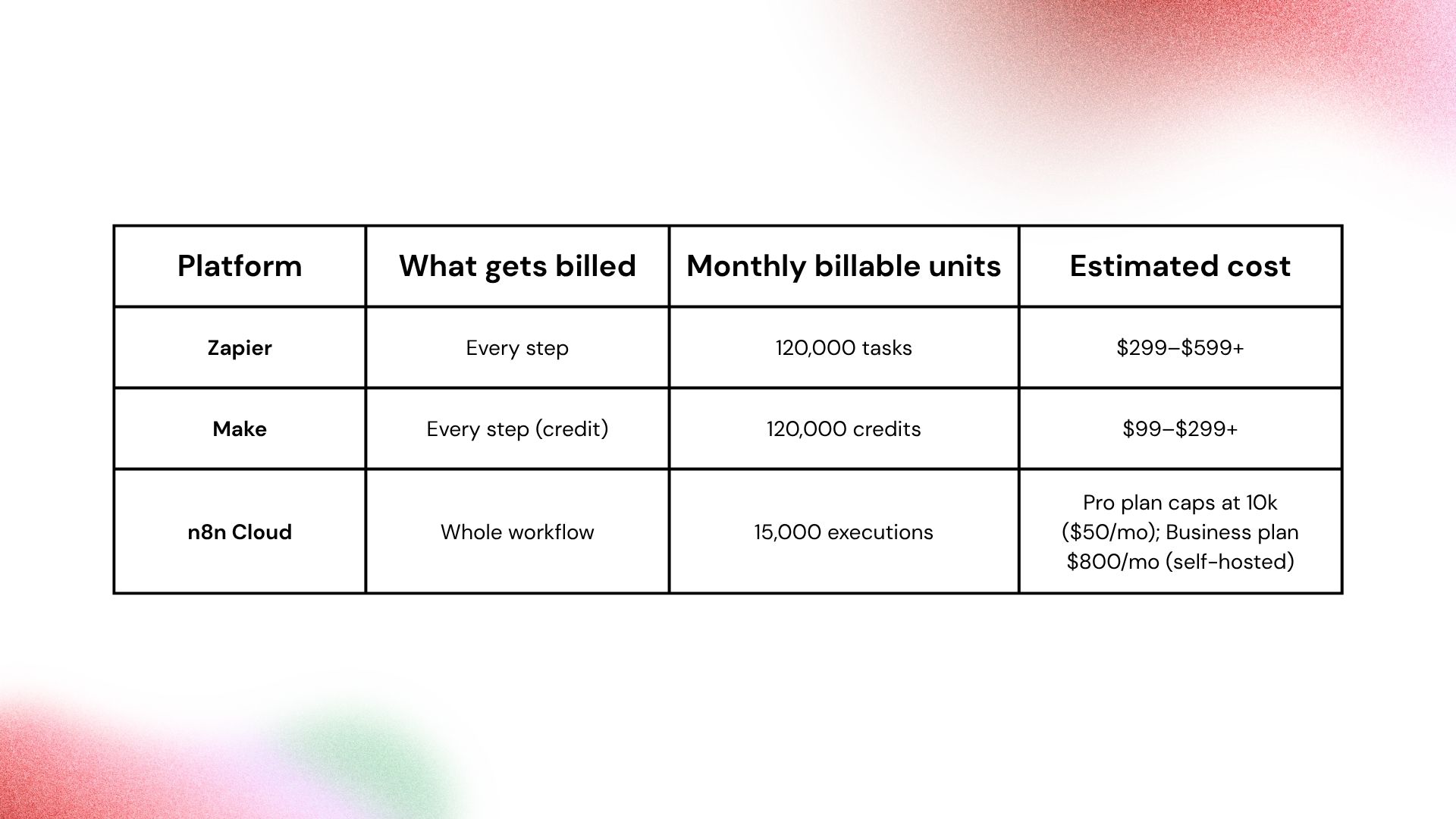
At 15,000 executions/month, the n8n Pro cloud plan (10,000 cap) is not sufficient. The Business plan at $800/month covers 40,000 executions but is a self-hosted plan, so you are running your own infrastructure regardless. The Community Edition (free software) does the same thing for just the VPS cost. For any ops team running workflows at this frequency, Community Edition self-hosted is the straightforward call.
Every time a workflow runs on Zapier or Make, the data inside that workflow passes through their cloud infrastructure. For most companies, this is an acceptable tradeoff.
For manufacturers, it is worth a second look. Consider workflows that include:
n8n self-hosted routes all workflow execution through your own servers. The n8n platform never sees the payload. For manufacturers in regulated industries, or those with strict supplier confidentiality requirements, this is a meaningful distinction.
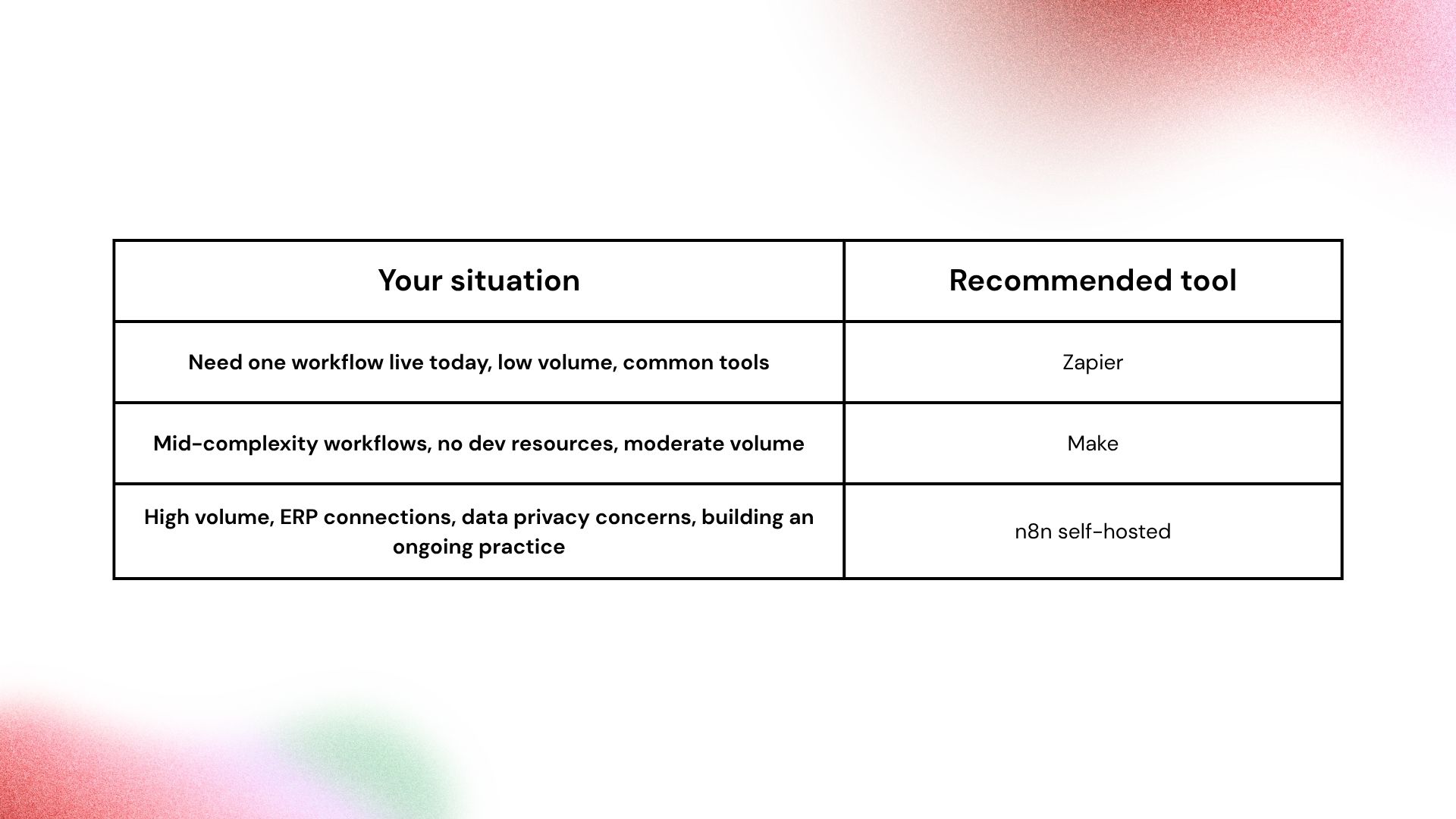
The "technical vs non-technical" framing that most comparisons use is not the right lens for operations leaders. The right lens is: are you building a one-off workflow or an automation practice? If you are building a practice, the platform that scales without surprising you on cost, keeps your data on your infrastructure, and connects to your actual systems is the one worth investing in.
If you want a framework for identifying and prioritizing the highest-ROI workflows in your operation, the Flow Kaizen guide walks through the discovery and sequencing process we use with manufacturing and distribution clients.

.png)
