

.png)
New wholesale accounts carry more risk than established ones. You have no order history with them, no sense of how they pay, and in some cases no confirmation that their account details are accurate. When a brand-new buyer places their first or second order, there is a reasonable argument for having a human look at it before it ships.
The problem is that most Shopify stores treat all orders the same way at the point of fulfillment. There is no automatic flag distinguishing a first order from an account that has been ordering reliably for two years. New customer orders get picked up in the fulfillment queue alongside everything else, and by the time someone notices a problem, the order has already shipped.
This Shopify Flow workflow fixes that by automatically flagging any order from a customer with fewer than two previous orders. Those orders are tagged, held from automatic fulfillment processing, and sent to an internal review queue. Your team reviews, approves, and releases them. Everything else processes normally.
Who this is for:
What it handles automatically:
This workflow does not evaluate credit, verify business legitimacy, or make approval decisions. It creates a hold and routes the order to your team. Your team makes the call.
The workflow fires on every new order. It checks a single attribute: how many orders has this customer placed in total, including the current one. If the answer is two or fewer, the order goes into the review queue. If the answer is three or more, the workflow exits without taking any action.

The condition checks customer.ordersCount, which in Shopify reflects the customer's total order count including the order that just triggered the workflow. A value of 1 means this is their first order ever. A value of 2 means it is their second. Both go into review.
Before setting this up, confirm the following:
From your Shopify admin, go to Apps > Flow. Click Create workflow in the top right.
Click Select a trigger and choose:
Order created
This trigger fires the moment any order is placed in your store, whether through the storefront, a draft order, or a POS transaction. It gives you immediate access to the order details and the customer record attached to it.
Click Add condition after the trigger.
Condition: Customer orders count
2
This catches customers placing their first or second order. Adjust the value to 1 if you only want to hold true first orders, or to 3 if you want an extra buffer on the third order as well.
Note on guest checkouts: Customers who check out as guests have no order history attached to their account. If your store allows guest checkout and a guest places an order, customer.ordersCount may return null or zero. Add a secondary condition to handle this: if customer.ordersCount is blank, treat it the same as a new account and route to review.
Add the first action in the true branch:
Action: Add tag to order
first-order-review
This tag is your review queue filter. In Shopify admin under Orders, you can filter by this tag at any time to see all orders currently awaiting review. It also makes it easy to build a saved view your team checks as part of their daily process.
Action: Add note to order
New customer — fewer than 2 previous orders. Pending review before fulfillment.
The note appears in the order timeline and is visible to anyone who opens the order in your admin. It explains why the order is tagged and held without needing to look up the workflow logic.
If your store processes fulfillment automatically, a tag alone will not stop the order from being picked and shipped. Use the fulfillment hold action to pause it at the system level:
Action: Hold fulfillment
New customer first-order review
This prevents any fulfillment app or manual fulfillment action from processing the order until the hold is released. Your team releases the hold when the review is complete.
If your fulfillment is entirely manual (your team picks and ships based on what they see in the orders queue), the tag and note may be sufficient without a formal fulfillment hold. Use whichever approach matches how your team actually works.
Action: Send internal email
First-order review: {{order.name}} — {{customer.firstName}} {{customer.lastName}}A new customer has placed an order that requires review before fulfillment.
Order: {{order.name}}
Customer: {{customer.firstName}} {{customer.lastName}}
Email: {{customer.email}}
Company: {{customer.defaultAddress.company}}
Order total: {{order.totalPrice}}
Items ordered: {{order.lineItems}}
This is order #{{customer.ordersCount}} for this customer.
Review and release this order in your Shopify admin:
https://admin.shopify.com/orders/{{order.id}}
The direct link to the order saves your team from searching. Include any additional context that helps your team make a quick decision, such as the account's registration date or any metafields from the wholesale application.
Action: Send email to customer
{{customer.email}}We received your order — {{order.name}}Hi {{customer.firstName}},
Thank you for your order ({{order.name}}).
As part of our process for new accounts, we do a quick review of first orders before they are processed for fulfillment. We will confirm your order and provide a shipping update within 1 business day.
If you have any questions, reply to this email or contact us at [your contact email].
[Your company name]
This prevents the customer from following up with your support team wondering why their order has not moved. Set a response window that reflects your actual review speed. If your team reviews within a few hours, say so.
To make sure held orders do not sit unreviewed, add a wait step:
Action: Wait
After the wait, add a condition:
Condition: Order has tag
first-order-reviewIf the tag is still present (meaning the order has not been reviewed and released):
Action: Send internal email
Unreviewed first order ({{order.name}}) — action neededThis creates accountability without requiring a team member to actively monitor a queue. The reminder comes to them.
Name the workflow: New Customer First-Order Review
Click Turn on workflow. All future orders from new customers will now be automatically held and routed for review.
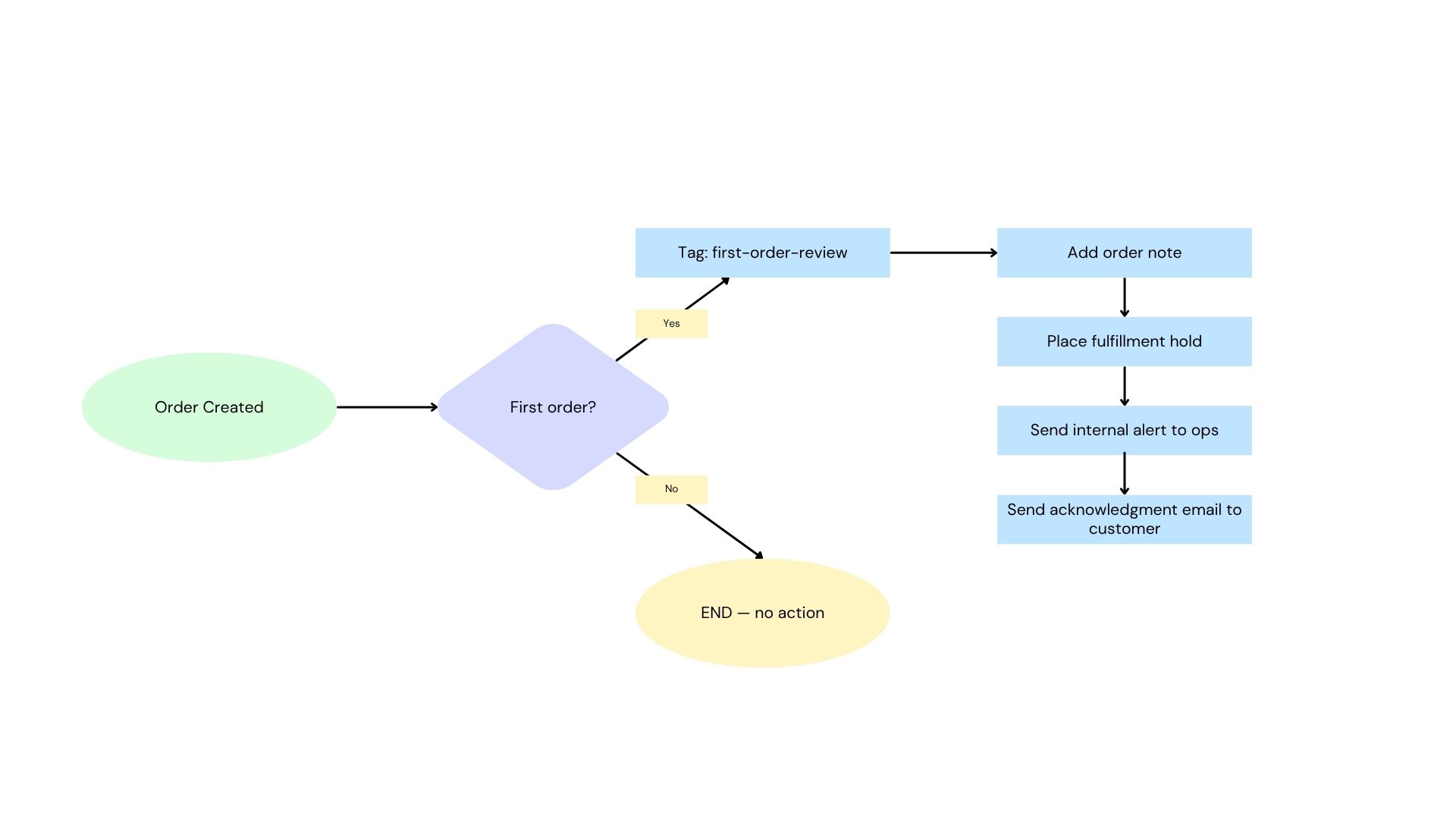
Here is the full workflow at a glance:

Orders from established customers pass through the trigger and exit immediately without any action. Only new customers hit the action block.
Adjust the order count threshold based on your risk tolerance
Two previous orders is a reasonable default, but you may have reasons to extend the review window. Some manufacturers hold the first three orders until a new account establishes a payment pattern. Others only hold the very first order. Set the threshold to match what your team actually needs to verify.
Add a minimum order value condition
If your concern is specifically about high-value orders from new accounts, add a second condition to the true branch:
Orders below the threshold from new customers process normally. Orders above it get reviewed. This reduces the volume of reviews for stores where small initial orders are low risk.
Combine with credit limit checking
For stores where new B2B accounts are approved with a credit limit, add a condition that checks whether the order total would exceed the customer's credit limit metafield. If it would, route to review regardless of order count. This workflow and a credit limit check can run as separate conditions within the same flow.
Release the hold as part of a companion workflow
Build a companion workflow that fires when the first-order-review tag is removed from an order. That workflow can release the fulfillment hold automatically and send the customer an updated confirmation that their order is now being processed. This removes the need for your team to manually release the hold in addition to removing the tag.
Track new account performance over time
Use the first-order-review tag history (filtered in Shopify reports) to understand what percentage of reviewed first orders had issues versus processed cleanly. Over time, this data helps you calibrate the threshold, whether to tighten it, loosen it, or add additional conditions based on patterns you observe.
This workflow creates a review hold based on order count only. It does not evaluate the customer's industry type, credit status, or order value independently. For stores with more complex first-order risk criteria, pair this workflow with additional conditions or a separate credit-check workflow.
It also does not handle the review step itself. A team member still needs to open each flagged order, verify whatever your internal process requires, and release the hold. For guidance on structuring that review process, see How to Set Up B2B Order Review
The workflow also does not remove the first-order-review tag automatically. Build a release workflow or include tag removal as a manual step in your team's review process so the queue view stays accurate.

.png)
